
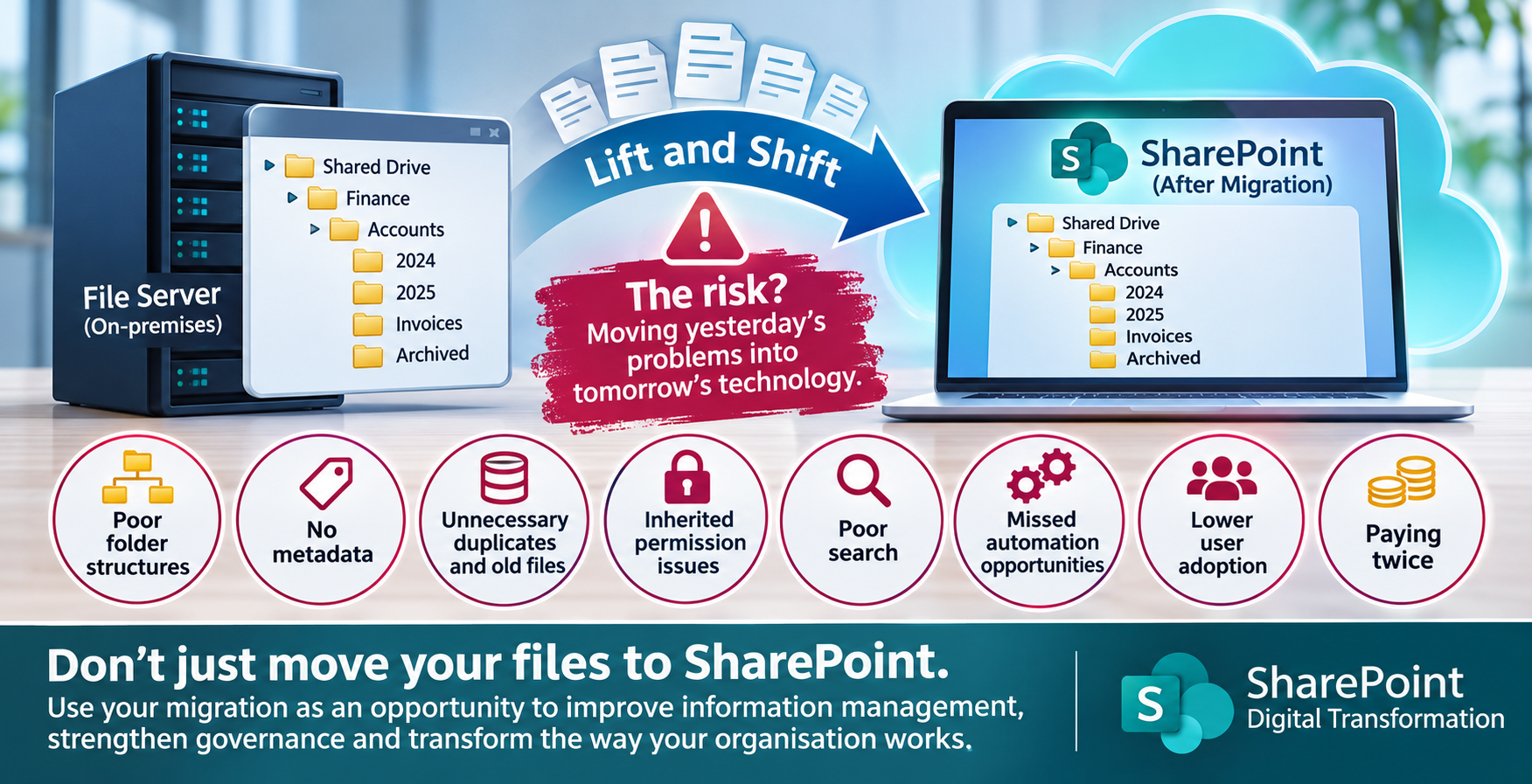
Moving your files to SharePoint is not the same as transforming your digital workplace.
Many organisations embarking on a Microsoft 365 transformation project make the same mistake: they assume that migrating their existing file server into SharePoint Online is simply a technical exercise.
The approach, commonly referred to as a lift and shift migration, involves transferring existing files and folder structures from a traditional network file server into SharePoint, often with very little consideration for how information is organised, accessed or managed.
Whilst this approach can appear to offer a quick and straightforward route to the cloud, it can also transfer years of accumulated problems into a brand-new environment.
At Blackbird Corporate Ltd, we believe a SharePoint migration should deliver much more than a change in document storage. It should provide an opportunity to improve information management, modernise business processes, enhance collaboration and transform how employees work.
In this article, we explore the potential disadvantages of lift and shift SharePoint migrations, the problems organisations should consider before migrating, and why taking a structured approach to SharePoint information architecture is essential.
What is a lift and shift SharePoint migration?
A lift and shift migration involves moving existing files and folders from a traditional network file server into SharePoint Online, with minimal changes to the existing structure.
For example, an organisation might have spent 15 years developing a departmental folder structure on its network drive. Rather than reviewing and redesigning that structure, the migration simply transfers it into SharePoint.
Although the documents are now stored in Microsoft 365, the organisation continues working in much the same way as it did previously.
This approach can provide a quick migration route, particularly where there is an urgent requirement to retire ageing servers. However, it does not necessarily take advantage of the functionality and opportunities that SharePoint provides.
The biggest risk is moving yesterday’s working practices into tomorrow’s technology.
10 disadvantages of a lift and shift SharePoint migration
1. Replicating poor folder structures
Traditional network file servers often contain deeply nested folder structures that have developed organically over many years.
Folders may have been created by individual employees, departments or projects, with little consistency in naming conventions or organisation.
Simply transferring these structures into SharePoint means users continue navigating through multiple levels of folders to locate information.
SharePoint provides opportunities to organise information using document libraries, metadata, content types and filtered views. A migration is an ideal opportunity to review whether the existing folder structure is still appropriate.
The risk: Your organisation ends up with a cloud-based file server rather than a properly designed SharePoint environment.
2. Missing the opportunity to introduce metadata
One of the most valuable capabilities of SharePoint is its ability to use metadata to classify and organise information.
Traditional file servers generally rely on users understanding where documents have been saved. SharePoint offers a more flexible approach.
For example, a document library containing invoices could use metadata such as:
- Supplier name
- Invoice number
- Invoice date
- Department
- Financial year
- Approval status
This allows employees to filter, sort and locate information without relying entirely on folder structures.
Metadata can also support automated processes, improve reporting and provide greater consistency across the organisation.
The risk: By simply replicating folders, businesses miss one of the biggest opportunities to improve document management in SharePoint.
3. Migrating unnecessary and duplicate information
File servers frequently contain years of accumulated information, much of which may no longer be required.
This could include duplicate documents, outdated policies, superseded procedures, old project files and information belonging to employees who have since left the organisation.
A lift and shift approach can transfer all this information into SharePoint without considering whether it should still exist.
Before migrating, organisations should assess their existing data and establish what needs to be retained, archived, reviewed or removed in accordance with their retention and information management requirements.
The risk: SharePoint becomes cluttered with unnecessary information, making document management and search more difficult.
4. Transferring existing permission problems
Security is another significant consideration when migrating from a traditional file server.
Network drives often have complicated NTFS permission structures, including individual user permissions, departmental groups and exceptions applied to specific folders.
Simply transferring these permissions can introduce unnecessary complexity into SharePoint.
Organisations should review who needs access to information, how permissions should be structured and whether historic access rights are still appropriate.
SharePoint permissions should be designed around business responsibilities, information sensitivity and collaboration requirements.
The risk: Historic security problems are transferred into SharePoint, potentially leaving confidential information accessible to people who no longer require it.
5. Failing to take advantage of SharePoint document management
SharePoint is much more than a document storage platform.
It provides functionality that can help organisations improve the way documents are created, managed, approved and maintained.
Examples include:
- Document version history.
- Content types.
- Managed metadata.
- Document approval processes.
- Document retention policies.
- Sensitivity labels.
- Document lifecycle management.
- Integration with Microsoft Teams.
A basic lift and shift migration may leave these capabilities unused.
The risk: Your organisation invests in Microsoft 365 but continues managing documents using traditional file server practices.
6. Poor search and information discovery
Finding information quickly is essential for an effective digital workplace.
On a traditional file server, users often rely on remembering the location of a document or navigating through a familiar folder structure.
SharePoint provides more sophisticated search capabilities, particularly when combined with a well-designed information architecture and meaningful metadata.
However, simply transferring thousands of documents without considering their organisation, classification and searchability can leave employees struggling to locate the information they need.
The risk: Users become frustrated with SharePoint and continue relying on familiar but inefficient ways of working.
7. Creating an unnecessarily complicated SharePoint environment
A folder structure designed for a traditional network drive does not necessarily translate into an effective SharePoint architecture.
A poorly planned migration can create excessive numbers of sites, document libraries, folders and inconsistent naming conventions.
SharePoint should be designed around how an organisation operates, how teams collaborate and how information needs to be accessed.
This includes considering:
- SharePoint site architecture.
- Departmental and project sites.
- Document library design.
- Site ownership and responsibilities.
- Navigation and information discovery.
- Microsoft Teams integration.
- Governance and lifecycle management.
The risk: An organisation creates a complicated SharePoint environment that becomes increasingly difficult to maintain and govern.
8. Missing opportunities for business process automation
A traditional file server primarily provides a location for storing and retrieving documents.
SharePoint, when combined with the Microsoft Power Platform, can become an integral part of an organisation’s business processes.
For example, businesses could introduce:
- Automated document approval workflows using Power Automate.
- Business applications using Power Apps.
- Automated document review notifications.
- Digital forms and approval processes.
- Document creation and management workflows.
- Management reporting through Power BI.
- Integration with Microsoft Teams.
These opportunities should be considered during the migration planning process.
The risk: Existing manual processes remain unchanged, and the organisation misses opportunities to improve productivity and operational efficiency.
9. Poor user adoption and resistance to change
Moving documents into SharePoint does not automatically mean employees understand how to use it.
SharePoint introduces different ways of working, particularly around document collaboration, permissions, metadata, sharing and version management.
Without appropriate communication, training and user adoption support, employees may struggle to understand the new environment.
A successful migration should include a structured adoption programme that helps employees understand not only how to use SharePoint, but why the organisation is changing the way it manages information.
The risk: Poor adoption, limited engagement and a reduced return on the organisation’s Microsoft 365 investment.
10. Paying twice for digital transformation
Perhaps the biggest commercial disadvantage of a poorly planned lift and shift migration is the potential cost of putting things right later.
An organisation might initially invest in moving its file server into SharePoint, only to discover 12 or 24 months later that the environment is difficult to manage, poorly structured and not delivering the expected benefits.
It may then need to invest again in:
- SharePoint architecture redesign.
- Document library restructuring.
- Metadata implementation.
- Permission reviews.
- Governance improvements.
- User training.
- Change management.
The risk: The organisation effectively pays twice to achieve the digital workplace it should have designed from the beginning.
What is the alternative to a lift and shift migration?
A successful SharePoint migration should begin with understanding how an organisation manages its information today and how it wants to work in the future.
Rather than automatically replicating existing file server structures, businesses should consider a structured migration approach that incorporates information architecture, data cleansing, governance and user adoption.
At Blackbird Corporate Ltd, we recommend considering the following seven stages.
Stage 1: File server discovery and assessment
Before migrating any information, establish what currently exists.
This should include:
- Assessing existing folder structures.
- Identifying data volumes and file types.
- Reviewing existing permissions.
- Identifying duplicate and redundant information.
- Understanding departmental requirements.
- Identifying business-critical information.
This provides the foundation for an effective migration strategy.
Stage 2: Design the SharePoint information architecture
Determine how information should be organised within SharePoint.
This involves designing the appropriate sites, document libraries, metadata, content types and navigation.
The architecture should reflect how employees work and how information needs to be accessed, shared and managed.
Stage 3: Data cleansing and preparation
Not every document stored on an existing file server necessarily needs to be migrated.
Work with departments and information owners to identify what should be migrated, retained, archived or removed.
Consider applicable legal, regulatory and organisational retention requirements before disposing of information.
Stage 4: Establish SharePoint governance and security
Define how the new SharePoint environment will be managed.
This should include:
- Site ownership.
- Permission structures.
- External sharing controls.
- Information classification.
- Retention policies.
- Document management standards.
- Ongoing governance responsibilities.
Good governance helps ensure that SharePoint remains secure, consistent and manageable as the organisation grows.
Stage 5: Structured SharePoint migration
Once the destination environment has been designed and prepared, migrate information into the appropriate SharePoint locations.
Where appropriate, introduce metadata, document classification and improved library structures as part of the migration.
The objective should be to deliver an organised and usable environment, rather than simply transferring files.
Stage 6: User adoption and SharePoint training
A successful migration depends on employees understanding how to use the new environment.
Provide role-based training that covers relevant SharePoint functionality, document management, collaboration, sharing and working with Microsoft Teams.
User adoption should be treated as an essential part of the migration project, not an optional activity once the technical work is complete.
Stage 7: Continuous improvement and optimisation
A SharePoint migration should not be considered the end of the digital transformation journey.
Once employees are using the new environment, organisations can identify opportunities to introduce Power Automate, Power Apps, Power BI and other Microsoft 365 capabilities.
This allows SharePoint to develop into a platform that supports wider business improvements.
Is lift and shift ever the right approach?
Yes. There are circumstances where a lift and shift migration can be a sensible and commercially appropriate decision.
For example, an organisation may have an urgent requirement to retire an ageing server, a limited migration budget or an existing folder structure that is already well designed.
In these circumstances, a phased migration approach may be appropriate.
The important consideration is that lift and shift should be a conscious decision based on business requirements, rather than the default migration strategy.
Where a business intends to use SharePoint as its long-term document management and collaboration platform, investing time in the architecture and planning stages can prevent significant problems later.
Why choose Blackbird Corporate Ltd for your SharePoint migration?
Blackbird Corporate Ltd specialises exclusively in Microsoft 365 and SharePoint, helping organisations transform the way they manage information, collaborate and work.
With over 16 years of experience specialising in Microsoft 365 and SharePoint, we understand that a successful migration requires more than technical expertise.
It requires an understanding of business processes, information management, governance and, most importantly, the people who will be using the new environment.
Our SharePoint consultancy and digital transformation services can help organisations with:
- SharePoint migration planning and assessments.
- SharePoint information architecture.
- Document management and metadata.
- SharePoint site and library design.
- SharePoint governance and permissions.
- Microsoft Teams and SharePoint integration.
- Power Platform and business process automation.
- SharePoint user adoption and training.
- Ongoing SharePoint support and optimisation.
Whether you are planning your first migration from a traditional file server or looking to improve an existing SharePoint environment, we can help you develop an approach that delivers long-term value.
Don’t just move your files. Transform the way you work.
Moving from a traditional file server to SharePoint Online represents a significant opportunity to modernise how your organisation manages information.
A poorly planned lift and shift migration can simply transfer existing problems into a new platform.
A properly designed SharePoint migration can improve document management, simplify information discovery, strengthen governance, enhance collaboration and provide the foundations for wider Microsoft 365 digital transformation.
Before you migrate, make sure you have the right strategy.
Ready to plan your SharePoint migration?
Speak to Blackbird Corporate Ltd about your SharePoint migration, information architecture and digital transformation requirements.
Visit: https://www.blackbirdcorporate.co.uk
Email: training@blackbirdcorporate.co.uk
Telephone: 0800 107 6362
Blackbird Corporate Ltd – Helping you transform your digital workplace.